After Ethan’s great work with Python scripting to allow the
.csv data to be turned in to animation streams and spline curves in Maya we faced the
next two new challenges;
Challenge 1 - Finding
True Time: Although the ‘ecs_CsvToMaya.py’ script allowed the data into Maya it
had no multiplication factor to make it match ‘true time’. In essence over two hours of data was being compressed in to fifty frames (two seconds).
Challenge 2– Different
lengths of Data: Each data file (.csv) ,Choir Heart Rate, Conductors Feet
Movement, etc had a different length (recording time) due to the complexities
of setting up devices whilst on location. The Cellist for example was recorded
for over two hours but the performance only lasts for one and half hours. This meant
that each data stream needed to be aligned and then ‘top and tailed’ to find
the concert performance.
Solution - The
solution for both problems relied upon finding an anchor point to match each
stream. Alongside each
data stream we also recorded sepereate audio/video files as reference which meant that we were able
to 'stack & achor' each on a timeline in Premiere. To do this we used the end of the performance
(last notes) to identify a consistant ‘time based clipping guide’. For example,
Aligned Audio /
Visual in Premiere
Choir
File Length: 2hrs 15m
27s - Concert Start Time at: 40m 12s - Concert End Time at: 2hrs 5mins 04s
Conductor
File Length: 2hrs 00m
08s - Concert Start Time at: 26m 24s - Concert End Time at: 1hrs 51mins 28s
Cellist
File Length: 2hrs 09m
29s - Concert Start Time at: 30m 19s - Concert End Time at: 1hrs 55mins 25s
ZDepth
File Length: 1hrs 25m
39s - Concert Start Time 7s - Concert End Time at: 1hrs 24mins 49s
Once we had this information we were able to
calculate that the multiplication factor to unlock true time (per file),
was a factor of ‘2.4’. Once this was added to the script we could be
sure that anything created in Maya would be a true visual representation of time
vs data. Finally, by using the ‘start/end time of the concert’ and Maya’s
timeline we were then able to set the time range to the concert only ensuring that each curve or animation generate was clipped to the correct length (‘ecs_CsvToMaya.py’uses the range of the timeline to calculate).
Cellist Arm Data
Stream Created Clipped in Maya
Success! - The next step, chopping the concert into sections…
As anyone whose following this blog knows, we have a collection of files containing data that was captured at a performance of Verdi's 'Requiem', using various sensors connected to several participants. The purpose of capturing this data was so that we could use it to create something in 3D that derives from that performance.
The files in question contain Comma Separated Values, simply known as .csv files. Since Autodesk Maya cannot read these files and no obvious solution (script/plug-in) could be found on the internet, it would seem like an impossible task to be able to make use of them in any meaningful way, but it's not 'game over' just yet!
My brief was to use the Python programming language to bridge the gap between the files and Maya. I would need to find a way to read the files, interpret the data and then find ways to represent that data in Maya.
In this post I will be outlining my progress on the script, covering my research and thinking behind it, and finishing with an overview of how it works and how to use it.
The CSV File
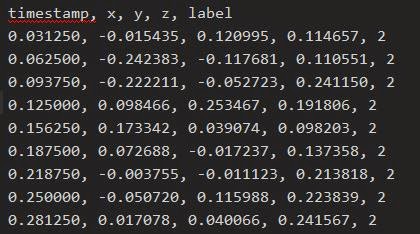
The first thing to understand about the .csv file type is that there are no strict rules on the format of the file; only that it is written in plain text (so it is humanly readable if opened in a text editor), that each line is a record containing fields separated by a delimiter (usually a comma), and that each line contains the same sequence of fields. While there are no requirements to label the fields, it is also common to use the first line to contain headings for each field. In our case all the .csv files we have use headings on the first line. Here is one of our examples:
What the Script Does
The script does several things:
The first function of the script is specifically for reading the data from any given file.
getCsvData("Path/to/a/file.csv")
This takes a file path, reads a file and it then returns a Python object containing the data in a format that can easily be used by other Python functions. It does this by reading the file line by line, using the commas to split each line of text into their individual values.
It assumes the first line contains the headings, so it will use that information to create a Python Dictionary Object, using each heading to contain a list for its values. As the script continues to read each line, the values are appended to the corresponding list in the dictionary. It is this dictionary object that is then returned by this function. Here is an example of what a Python dictionary looks like:
Each dictionary entry is a key:value pair. 'timestamp' being the key to access a Python List (the square brackets). The list would look something like this:
['0.031250', '0.062500', '0.093750', '0.125000']
Once a file has been read by this function and its output stored in a variable, it is possible to use the data within Python without needing to re-read the file.
As said previously, .csv files can contain any kind of data, some of which is not necessarily going to be useful to Maya. While the above function is designed to read any .csv file into Python, what we do next with this data is going to be specific for each file.
The next few functions written for the script are written specifically for the files that we are working with.
I shall use the heart rate file as an example of how I use the data.
This function creates an empty group node in Maya with the following animated attributes.
speed pace heartRate averageSpeed averagePace averageHeartRate latitude longitude distance
This .csv data contains a "Workout Time (secs)" column. The function accesses the values in that column, (in this case, the current time in seconds), and for each one, the corresponding attribute values are accessed and a key frame is set at that time, and that value.
The script also uses a helper function to convert the time from seconds to frames, taking the scene frame rate into account automatically. Here is what the extracted animation data looks like:
Writing a function to read the csv data object is fairy straight forward as shown in this Python code snippet.
def printCsvColumn(csvData, columnName)

    for i in range(len(csvData[columnName])):
        print csvData[columnName][i]
This code takes a csvData object and the name of a column, and prints out the values of that column.
Basic Usage of the Script
For all team mates on project Requiem, here is a quick overview on how to use the script.
To install the script you need to put the .py file inside one of the 3 script folders in your local maya settings folder. As an example:
Windows: <drive>:\Documents and Settings\<username>\My Documents\maya\<Version>\scripts
Mac OS X: ~/Library/Preferences/Autodesk/maya/<version>/scripts
Linux: ~/maya/<version>/scripts
Once this is done, run Maya and open up the script editor. Then inside a Python tab, run the following:
First we need to 'import' the script's functions. We use the namespace of 'csv' so we don't have to type out the full name.
import ecs_CsvToMaya as csv
Next we run the function 'getCsvData' and parse in the file path to a csv file as a string. The data is returned and stored in the variable 'csvData':
csvData = csv.getCsvData("Path/to/a/file.csv")
Note the quotation marks around the string, and the 'csv.' before the function name. If we didn't use the namespace when importing the module, we would have to write it like this:
ecs_CsvToMaya.getCsvData("Path/to/a/file.csv")
Now that we have the data available in Python we can use the other functions in the script to represent that data as keyframes. As each file is different we need to make sure we use the right function for the right file.
For the heart rate file, we need to use this function:
csv.createCsvHeartRateData(csvData)
This will create an empty group with all the relevant data animated on some custom attributes.
However for the rest of the files we can use this function:
csv.createCsvSensorData(csvData)
This will create a locator with the translate X, Y, and Z attributes animated.
So the completed code to run in Maya should look something like this:
So for each file we need to read in the data, then use the correct function to get the data into Maya.
In this case the heart rate file is the only exception, and for the rest we can use the other function.
On last set of functions have also been included, that generate Nurbs Curves from the animation data.
To use these you can run either of the following commands in Python (replacing with correct node and attribute names):
You can use the Maya time slider to select a time range from which to generate the curve from.
create3DCurve() specifically works on the translate X, Y and Z attributes to generate a full 3D curve, while the create2DCurve() will generate a flat curve on any other attribute. Here is an example of what the 'pace' attribute generated from the heart rate file:
Taking the Script Further
Currently the script will not be made publicly available, as the script is very much geared towards this project only. However it is my intention to continue developing this script so that it can be used on other projects, and by other people. I'm thinking that the tool would need to be generalised so that it could be possible to analyse any csv file from within Maya and choose how to interpret the data, rather than needing to write specific functions on a per-file basis.
Perhaps it would be possible to provide a set of nodes that are designed to interpret the data in different ways, which could then be plugged into existing Maya nodes to animate objects, create effects or generate meshes on the fly etc; and of course, some kind of graphical user interface.
So there we have it! I hope that readers have found it interesting, and informative.
Following CGAA's successful participation in last year's ACT project, in which our students, staff and alumni collaborated to create an animation inspired by composer Darius Milhaud's 1923 ballet, La création du monde, we've been challenged by ACT once again to visualise classical music in new and speculative ways. The piece in question is Giuseppe Verdi's mighty Requiem(1874), a musical setting of the Roman Catholic funeral mass. Verdi's ninety minute Requiem is perhaps best known to most of us by the explosive Dies Irae or Day of Wrath:
On the evening of July 3rd and 4th at the Royal Opera House's High House Production Park at Purfleet, Verdi's Requiem will be performed live by an ensemble of 300 musicians - and beamed live via a screen into the Production Park's orchard. Our mission is to devise an innovative way of visualising the music of the Requiem that will compliment and enrich this outdoor concert and bring new dimensions to Verdi's operatic masterpiece.
The Orchard
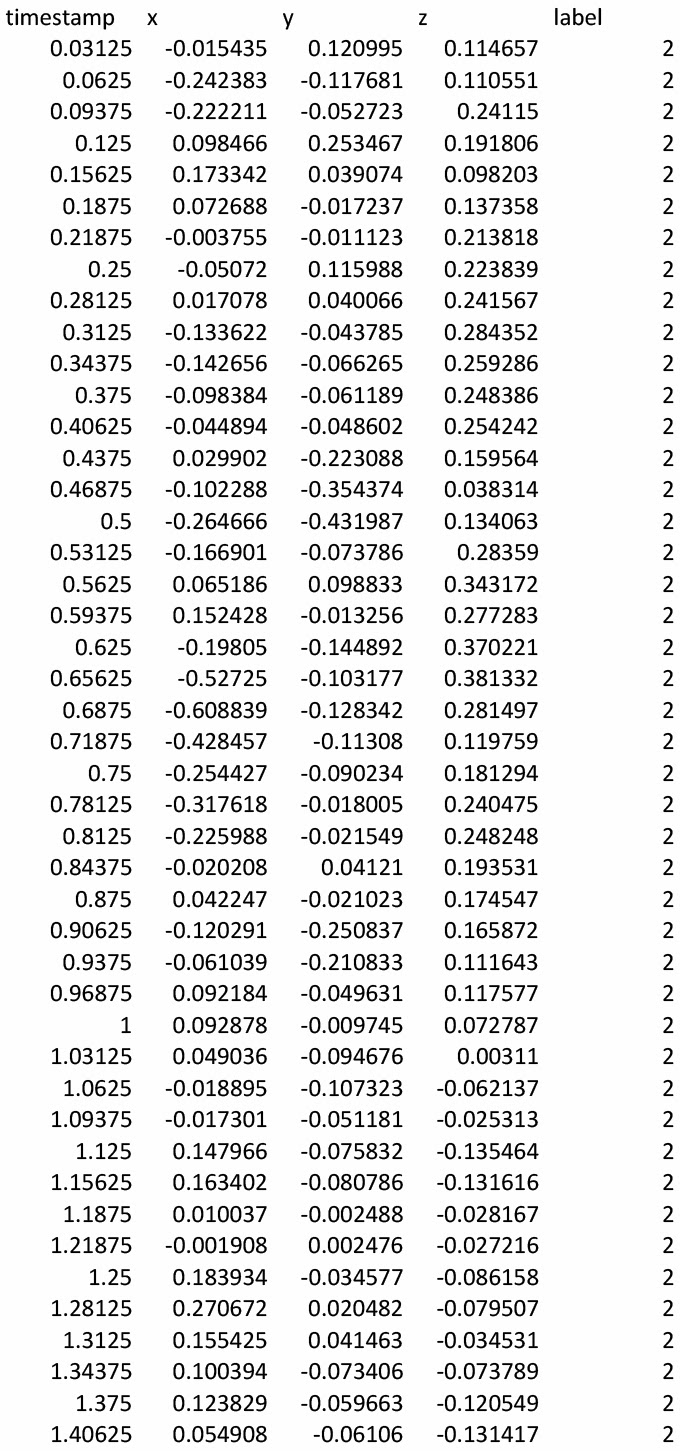
Work on this project began back in December 2013, when Pete Wallace of Butch Auntie fame travelled to Amiens, France with a very specific remit. Pete's mission was to turn a live performance of Verdi's Requiem into raw data - not by recording the music itself, but rather by capturing the performance as experienced by its various participants. Uninspiring as it may seem, the great long list of numbers below is a direct transcript of Verdi's Requiem, as generated from moment-to-moment by the gesticulations of the orchestra's conductor, Arie van Beek, who was wired up to Kinect technology for the duration of the performance.
Pete was similarly able to capture the Requiem via the activity of the lead cellist's arm and by the heart-rate of a member of the choir. In simple terms, Pete came back from Amiens with 'lightning in a bottle'; the vivacity and verve of Verdi-performed-live encompassed in a series of spread-sheets.
Our creative task now is to again let loose that vivacity, that verve - to translate these numerical expressions of music into something extraordinary. It's early days, and the precise form our visualisations-of-Verdi may take on that July evening in the High House orchard are as yet unknown, but we think we'd like to manifest them physically. Our thoughts - barely more than vague impressions at this stage - have turned to the kinetic sculptures of Alexander Calder and the fluid delicacy of tensile fabric structures:
What we do know is that we'll be using Maya, animation, and you - the CGAA community - to get us there. We know too that CGAA alumni Ethan Shilling is joining us for this project and will bring his considerable technical expertise and creativity to the mix.
Exactly what happens next is uncertain. How exciting! But what happens will happen here on the ACT blog, so watch this space for updates. As of now, CGAA's Mission Verdi is go.
The July concert was a great success and the animation lauded by the audience and project co-ordinators - so much so that we were invited to participate in a second performance of Milhaud's ballet - this time at the Maison de la Culture in Amiens, France.
A little after 9.30pm on December 19th, after a very long day of set-up and back-stage preparation, the house lights dimmed and the musicians of the Orchestre de Picardie began to play the first, melancholy notes of Milhaud's ballet. Behind them, rear-projected onto the theatre's pristine twelve metre screen, our animation began to play too - with an audience of 600 people looking on.
I'm including here the email I received from Rose Bardonnet Lowry - executive director of the Orchestre de Picardie and ACT co-ordinator:
"Didn't have a chance to congratulate and thank you, as well as Jordan and Tom, for the wonderful performance tonight! The audience loved it!!! Listeners were quite stunned by the novelty of it all. We'll certainly have 2 more opportunities of performing the Milhaud piece with visualistion in 14-15, so I hope you will all be ready to come back to Picardie."
It looks to me as if our recent adventures in Amiens might be the first of many! I think we can all be rather proud of ourselves, don't you?
A CG Arts and Animation/ACT/Interreg Live Commission
On Friday, July 12th at Grays Civic Hall, Essex, the Orchestre Symphonique de Bretagne performed a programme of music on the theme of 'rhythm'. The programme of music explored ideas of rhythm in classical music and in the celebrated jazz of the late Dave Brubeck. The director of the Orchestre Symphonique de Bretagne, Marc Feldman, challenged the CGAA community to work collaboratively to create an original work of animation designed to accompany his orchestra's performance of one particular example of early twentieth century music that blends classical and jazz rhythms to exciting effect. The animation was rear projected onto a large screen measuring 8.5m wide by 6.2m high, in front of which the Orchestre Symphonique de Bretagne performed live.
Over a period of ten consecutive week days, the students, staff & alumni of Ba Hons CG Arts & Animation were challenged to produce abstract digital paintings in synesthetic response to segments of the music to be performed by the Orchestre Symphonique de Bretagne. The CGAA community were asked to listen to a musical extract and then respond to it visually through the creation of original digital paintings in Photoshop. The animation was derived from these paintings and created using Autodesk Maya and After Effects.
Rendering is complete for all tracks, but whilst I have the opportunity to touch up a few bits, I'd thought I'd upload the two tracks which have been through a lot of changes and discussion.
Track 05
So, this was a piece that needed energy and chaos. The explosive paintings from Phil Gomm provided a great cut in the middle of the piece and the key was to really make the energy and movement get almost out of control. I'll be re-rendering this piece because there are a few changes I've now made but any suggestions would be great.
Track 10
Track 10 was also a complete overhaul and now has an abstract landscape generated from a number of speed paintings. The ending has been tweaked so that it fades away bit by bit. This is very much a final flight following strange shapes across the landscape and will hopefully provide a dream like finale to the piece.
The final week is almost upon us and the rendering will begin soon. But before all that, it's a manic weekend of final changes, adjustments and corrections. The big change so far is a rework of Track 10. The last version was really lacking, and it just felt so unaware of it's base. So, I started fresh and it's already moving in a much more interesting direction.
Track 10
The key thing was to go back to the speed paintings and really think about what this piece was suggesting. The biggest problem is the lack of source material and notions. The music is very sparse, and thus the speed paintings vary wildly. From dark minimal images, to vivid explosions of colour. It all started with Joey Ku's and Dayle Sanders' images, both full of colour and life. These formed the base of the animation and helped build a strange landscape. The music really gives this impression of flying through a world as it slowly falls into silence. From these paintings, I started to build this abstract world and animate elements to emphasise this slow descent. It felt very enlightening and pleasing, despite it being the end of the piece, almost a surreal and dreamlike state of descent. So, this is the base, it hopefully provides a solid form to work from. The two areas I really want to get fixed this weekend are; to change the wavy coloured lines that act as transitions, and add in elements to help bring some excitements to certain parts. Phil Gomm's speed paintings suggest an almost firework display of explosion, which I think will add nicely to the subtle beats within the sequence.
Track 06
This sequence is another which is still in the works, but I'm uploading it with some changes so that I can get feedback about what could be added. It's definitely a piece which needs something extra, but I'm also wary about adding too much. The music for this part again has a strange wondering sensibility about it, and this is something I definitely want to keep. I've made changes to the end, partly because the previous spiral motif was a default stand in. This is going to require some further thought but for now it is definitely still open for adjustments.
All in all, things are moving towards completion. But this weekend is definitely the time to make changes and get things ready to render. The list below outlines what needs doing on my part.
Sequence 02 - Complete, slight adjustments need to be made before rendering.
Sequence 04 - Complete, again, final adjustments before rendering.
Sequence 05 - Incomplete, reassess and fix issues ready for render.
Sequence 06 - Complete, but additions to be made before rendering.
Sequence 10 - Incomplete - Addition elements and animation required before renders.
So, lots to do but if all goes well, rendering should begin for Monday morning.
I never quite explained my reasoning for taking the track in this direction compared to other sequences. It seems like a detour in some ways but I think the music develops so much later on that starting at this point feels perfectly natural. The music feels so slow and contemplative it's like wading through water and the opening track feels much more suited to being a proper 3D space to travel through. It's not super fast-paced jazz. It's slow, methodical and hypnotic. I've tried replicate this feeling through movement The audience will get sucked in.
I'd experimented with using Maya on the very first test for this project using Andriana's speed painting to generate the particles. This is the same particle experiment. Placing a moving camera into the scene, with all the joys of perspective and depth can bring, threw it completely open. A couple sacrifices from the original painting are going to be made because it's a re-imagining based on concept art, and not directly made through the painting like my other sequences. My goal with this sequence is to now just bring a bit more of the painting into the scene.
So, now that I've worked out what is working and what isn't, it's time to go back with a fresh mind and make these pieces fantastic. Track 10 is dead to me, the first draft was a default which lacked just about everything. Tomorrow I'll be re approaching that section and rethinking it from scratch. But today, I've made adjustments to Track 02. Some further adjustments are still to be made, but the notes I wish to hit are there at the moment. Some of the methodology and ideas are laid out below.
Track 02
(The youtube upload has pushed the sound slightly out of sync)
The way in which I work on this project is possibly different to how I original intended, but the approach nonetheless feels like an inherently correct one to me. I first start by looking through all of the speed paintings. I look for notions, colours, themes and ideas that seem consistent throughout the works. I then take the speed paintings that seem most connected to the music and put them all into After Effects. From these I grab elements and layers and start placing them onto a new composition. The consistent notions that are seen become the building blocks for my sections. So,using Track 02 as an example...
The two big themes which are apparent in a huge number of the speed paintings are spirals and explosions of some sort. Circular notions and paint strokes seem to highlight how the music moves. This was the key structure. So the base form of a spiral made complete sense. The music gives this impression of moving through or falling down. The spirals came primarily from Simon Holland, Ryan Leitao, Molly Bolder and Adam Webb's work. The whole piece is a build up. It slowly forms to an explosive moment where the sound erupts out at the audience. This is again, reflected in the artwork. Vikki Kerslake, Lucy Yelding and Emily Clarkson demonstrate this theme within their speed paintings. It feels like an opening moment, the demonstration of a theatre act or the like. So, the spiral transforms into an explosion and reveals this strange spinning world. Many of the elements from Ryan Leitao were used for this section, and even though brief, it is a section that works because of that build up. Suddenly this downward move feels apparent in the music. The notions from my own speed paintings, as well as Lydia Caplan's, were the inspiration for this. Almost as though rain is clearing the scene for the next sequence.
For the final sequences, I'll be reminding myself of this methodology and ensuring that each is thrilling in this sense of reaction. More updates on the other sequences tomorrow!